OddlyScanner · Public guide
How to read odds movement
Start by identifying the match and market, then examine the sequence of observations. This approach helps you explore the scanner’s published examples.
1. Identify the match and mode
Check the teams, league and scheduled start. Use Prematch before the game and Live during play. Choose football or basketball on the home page.
2. Compare matching conditions
Note the selection, line value and odds. Comparing Over 2.5 odds with Over 3.5 odds is not a comparison of the same line.
3. Calculate the price change
Demonstration from the home page: 2.90 → 2.05. The decline is (2.90 − 2.05) / 2.90 × 100 ≈ 29.3%. The first value is the comparison baseline.
This percentage describes the odds change. It is not a signal’s success probability. These numbers are a worked example, rather than a current match.
4. Check chronology and events
Check the observation timestamps and the available history interval. In Live, compare the movement with the score, minute and displayed events. Keep your conclusion open when the data is incomplete.
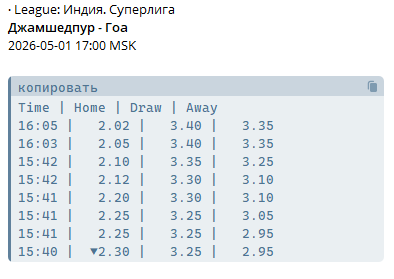
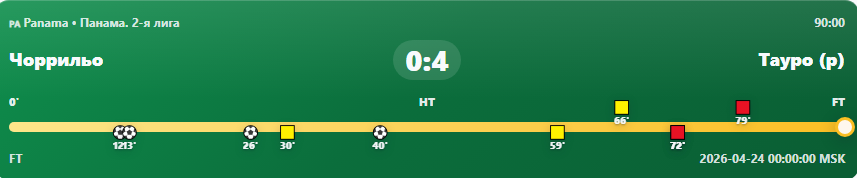
Below are previously published examples of a prematch table and a match-card timeline. They are separate interface illustrations and should not be combined into the history of one match.
5. Open the card and access information
Open the event card from a table or alert for available details. The website is free; contact @OOPfix for paid Telegram bots.