OddlyScanner · Public guide
Odds movement before a match
The prematch scanner is for examining the line before a game starts. Comparing observations helps you see when the odds, line or market availability changed.
Choose a match and time context
Choose football or basketball on the home page, then open Prematch. First check the teams, league and scheduled start time.
Look at each observation time and the available history interval. A missing observation should not be read as proof that nothing changed.
Price, line and selection
Compare odds for the same selection and line. A different total or handicap changes what is being compared.
Examine movement in the table, then open the event card for available details. The markets shown depend on the selected event and current coverage.
Using the published examples
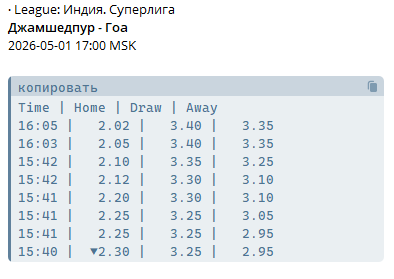
The prematch table below comes from the project’s public demonstration. The image preserves a historical example; open the scanner for current events.
The website dashboards are free. Contact @OOPfix for paid Telegram bots and notification terms.