OddlyScanner · Public guide
Live odds movement scanner
Open a match and examine odds changes alongside the score, timing and available history. OddlyScanner brings this context together on one page.
What to check during a match
Start with the sport selector and Live mode on the home page. Football and basketball are available. The event list and available history depend on current coverage.
Check the teams, score and observation time on the match card. The published football examples also show match events and a timeline.
Compare the same market
Before comparing two odds values, check the selection, outcome or total, and the line value. A price change and a change in the line itself need separate consideration.
Movement near a goal, a break or a score change has context. History helps you see the order of observations; it does not automatically explain the cause of every change.
Published example and Telegram
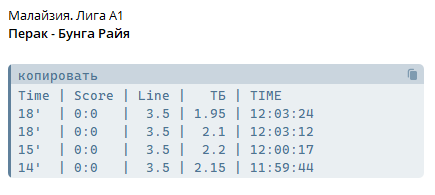
Below is a previously published live table example. It illustrates the interface, rather than a current match or a new alert. Use the linked guide for a step-by-step explanation.
The website is free. Telegram bots are a separate paid product. Ask @OOPfix about available channels and access terms.